

Drafting Guide
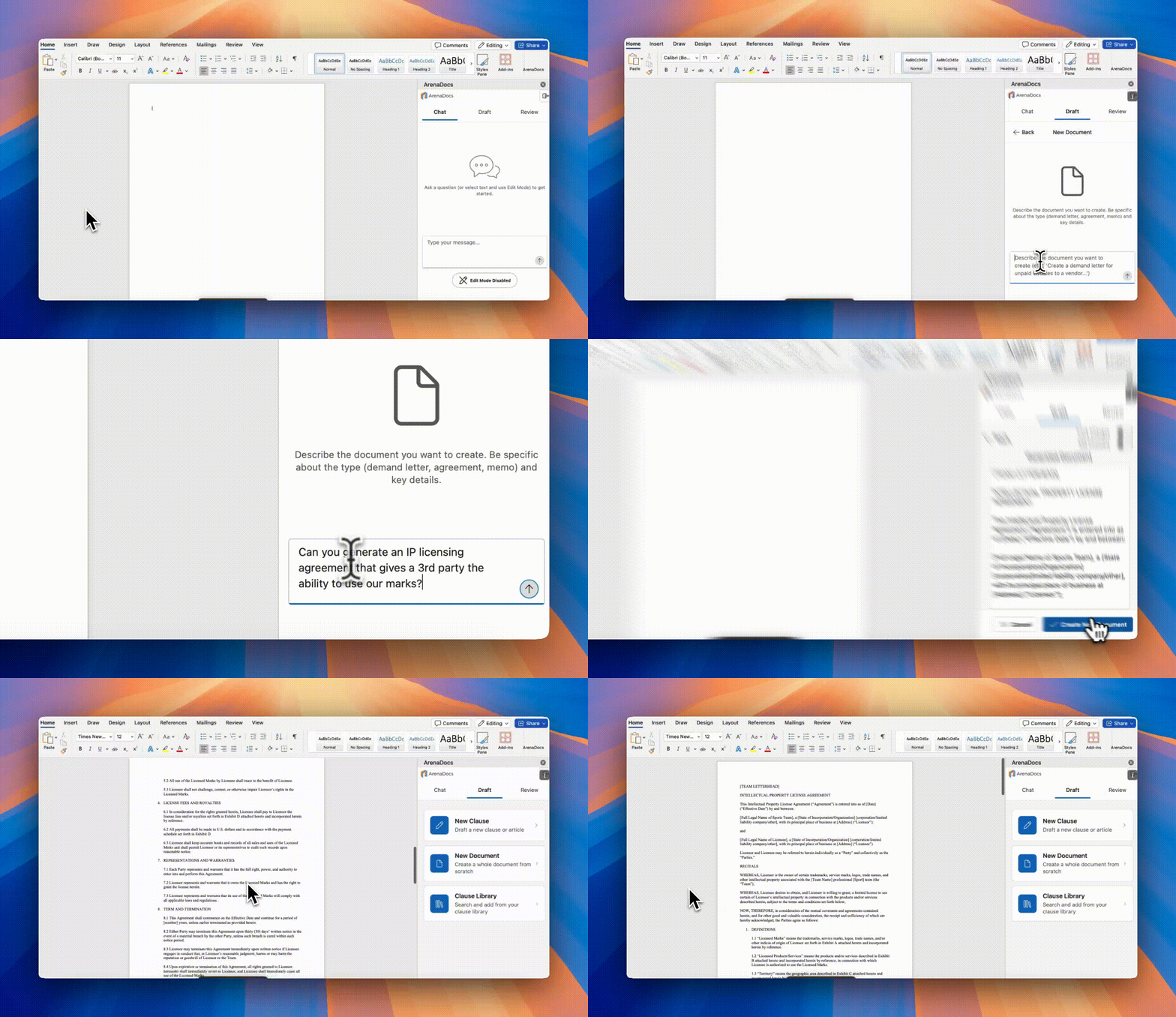
Create professional legal clauses and complete documents with AI assistance.
Table of Contents
- Overview
- Drafting Clauses
- Drafting Documents
- Understanding Generated Content
- Writing Effective Prompts
Overview
The Draft tab provides two primary capabilities:
| Feature | Description |
|---|---|
| Draft Clause | Generate 4 clause options from a description |
| Draft Document | Create complete documents from scratch |
| Clause Library | Browse and insert existing clauses |
How AI Drafting Works
- You describe what you need in natural language
- AI finds similar clauses from your organization's library
- AI generates new content grounded in your templates
- You select the best option and insert into your document
Drafting Clauses
Generate professional legal clauses tailored to your needs.
Starting a Draft
- Navigate to the Draft tab
- Click "Draft New Clause"
- Enter your description in the text area
- Click "Generate"
Description Best Practices
Be Specific
Vague (Less Effective):
Payment terms
Specific (More Effective):
Payment terms requiring net-30 payment with 1.5% monthly
interest on late payments, right to suspend services
after 60 days delinquent, and requirement for annual
credit review
Reference Context
Without Context:
Indemnification clause
With Context:
Mutual indemnification clause for a technology vendor
agreement, covering third-party IP claims with standard
carve-outs for claims arising from our specifications.
Should match our standard vendor agreement template.
Specify Tone and Style
Force majeure clause with broad coverage including
pandemic events. Use formal legal language consistent
with our enterprise agreements. Include both suspension
and termination rights.
Generated Options
You'll receive 4 different clause options, each offering a different approach:
| Option | Typical Variation |
|---|---|
| Option 1 | Conservative/protective approach |
| Option 2 | Balanced/mutual approach |
| Option 3 | Detailed/comprehensive approach |
| Option 4 | Concise/streamlined approach |
Evaluating Options
For each option, review:
- Content - The actual clause text
- Comment - AI explanation of the approach
- Sources - Which of your templates influenced this option
Inserting a Clause
- Click on your preferred option to expand
- Review the full text
- Click "Insert" to add to your document
- The clause appears at your cursor position
Insert Options
| Option | Description |
|---|---|
| Track Changes | Insert with revision marks |
| Plain Insert | Insert without tracking |
Drafting Documents
Create complete legal documents from descriptions.
Supported Document Types
| Document Type | Common Uses |
|---|---|
| Demand Letter | Payment demands, breach notices |
| Sponsorship Agreement | Sponsor deals, naming rights |
| Vendor Agreement | Service contracts, procurement |
| Legal Memo | Internal analysis, recommendations |
| Cease & Desist | IP infringement, trademark issues |
| Settlement Agreement | Dispute resolution |
| License Agreement | IP licensing, software |
Creating a Document
- Navigate to the Draft tab
- Click "Draft New Document"
- Enter a detailed description:
Demand letter to XYZ Sponsor regarding unpaid Q3
sponsorship fees totaling $75,000. Payment was due
September 30, 2024 per Section 4.2 of our Sponsorship
Agreement dated January 15, 2024. Tone should be firm
but maintain relationship. Give them 15 days to respond.
- Click "Generate"
- Review the complete document
- Click "Insert" to replace or add to Word
Document Structure
Generated documents include appropriate structure:
- Proper letterhead format (for correspondence)
- Party identification
- Recitals/background (for agreements)
- Numbered sections
- Signature blocks
- Date placeholders
Customizing After Generation
After insertion, you can:
- Edit directly in Word
- Use Edit Mode for AI-assisted revisions
- Add your organization's letterhead
- Fill in specific details marked as placeholders
Understanding Generated Content
ArenaDocs shows which of your templates influenced generated content, helping you understand the basis for the language and maintain consistency with organizational standards.
Why This Matters
- Consistency - Ensures alignment with organizational standards
- Confidence - Know the basis for generated language
- Compliance - Track where language originates
- Quality - Better templates lead to better results
What's In Scope
ArenaDocs handles any legal drafting request, including:
- Contract clauses and provisions
- Complete agreements and contracts
- Legal correspondence (demand letters, etc.)
- Memos and analysis documents
- Business terms and conditions
- Sports-specific legal content
What's Out of Scope
The system will politely decline:
- Personal legal matters (wills, divorce, custody)
- Criminal or immigration law
- Medical or health advice
- Technical/coding assistance
- Non-legal content (recipes, travel, fiction)
Writing Effective Prompts
Master the art of getting the best results from AI drafting.
Prompt Structure
Basic Structure:
[What you need] + [Context] + [Specific requirements] + [Style/tone]
Example:
[What: Confidentiality clause]
[Context: for a marketing agency agreement]
[Requirements: 3-year term, mutual obligations, carve-outs for
public information]
[Style: Match our standard vendor agreement format]
Prompt Examples by Type
Payment Terms
Payment clause for a 3-year sponsorship agreement worth
$500,000 annually. Quarterly payments due 30 days after
invoice. Include: late payment interest at 1.5% monthly,
right to terminate after 90 days delinquent, and cure
period of 10 business days after written notice.
Indemnification
Mutual indemnification for a technology services agreement.
Each party indemnifies for their own negligence and
willful misconduct. Include: third-party IP claims
(with carve-out for our specifications), defense and
hold harmless language, and notice/cooperation requirements.
Termination
Termination provisions for a venue license agreement.
Include: mutual right to terminate for convenience with
90 days written notice, immediate termination for material
breach after 30-day cure period, and automatic termination
for bankruptcy or insolvency.
Force Majeure
Force majeure clause for event agreements. Cover:
natural disasters, pandemics, government actions,
terrorism, labor disputes. Include: notice requirements
within 48 hours, mitigation obligations, right to
terminate if event extends beyond 60 days.
Tips for Better Results
| Tip | Example |
|---|---|
| Be specific about numbers | "30 days" not "reasonable time" |
| Reference your templates | "Like our ABC agreement..." |
| Specify the relationship | "...where we are the licensor" |
| Indicate party perspective | "Protective of our interests" |
| Mention industry context | "Sports sponsorship context" |
Related Guides
- User Guide - Complete feature overview
- Clause Library - Managing templates
- Chat & Edit Mode - Inline editing
- Review Guide - Document analysis