

Document Review Guide
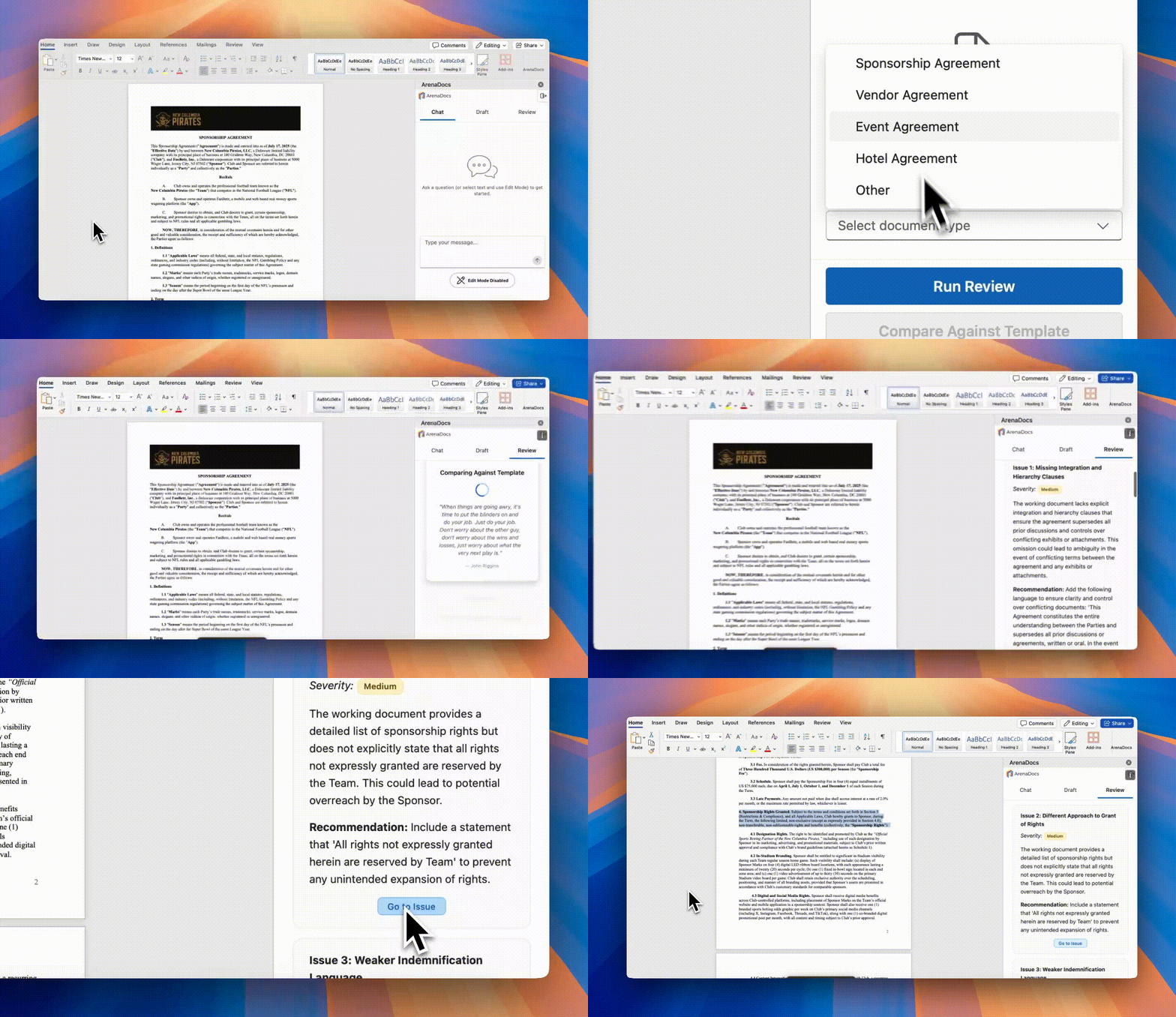
Comprehensive AI-powered document analysis and template comparison.
Table of Contents
- Overview
- Running a Review
- Understanding Results
- Template Comparison
- Managing Templates
- Working with Issues
Overview
The Review tab provides two powerful analysis features:
| Feature | Description |
|---|---|
| Run Review | Comprehensive AI legal analysis |
| Compare Against Template | Compare to gold-standard templates |
What Reviews Analyze
- Drafting Quality - Grammar, consistency, typos
- Legal Issues - Missing provisions, weak language
- Business Risks - Unfavorable terms, liability exposure
- Compliance - Industry and sports-specific requirements
- Numerical Accuracy - Written vs. numeric consistency
Running a Review
Step 1: Open Your Document
Ensure your contract or legal document is open in Word.
Step 2: Select Document Type
Choose the appropriate type from the dropdown:
| Type | Use For |
|---|---|
| Sponsorship Agreement | Sponsor deals, naming rights, promotional agreements |
| Vendor Agreement | Service providers, suppliers, contractors |
| Event Agreement | Event hosting, venue rentals, productions |
| Hotel Agreement | Team travel, group rates, accommodations |
| License Agreement | IP licensing, merchandise, content rights |
| Non-disclosure Agreement | Confidentiality, trade secrets |
| Independent Contractor | Consultant agreements, freelancers |
| Other | Documents not fitting above categories |
Step 3: Run the Review
Click "Run Review" to start the analysis.
Processing Time
| Document Size | Typical Time |
|---|---|
| Short (< 10 pages) | 30-45 seconds |
| Medium (10-30 pages) | 45-90 seconds |
| Long (30+ pages) | 90-120 seconds |
Progress Indicators
During review, you'll see status messages indicating the AI is analyzing your document.
Understanding Results
Issue Display
Each issue includes:
| Component | Description |
|---|---|
| Title | Brief issue summary |
| Severity | High / Medium / Low rating |
| Description | Detailed explanation |
| Recommendation | Suggested resolution |
| Section Citation | Link to document location |
Severity Ratings
High Severity
Characteristics:
- Significant legal or business risk
- Could result in material liability
- Requires immediate attention
Examples:
- Missing limitation of liability
- One-sided indemnification
- Unlimited penalty provisions
- Missing insurance requirements
Medium Severity
Characteristics:
- Moderate concern
- Could create problems under certain circumstances
- Should be addressed before signing
Examples:
- Ambiguous termination rights
- Weak confidentiality provisions
- Non-standard payment terms
- Missing notice requirements
Low Severity
Characteristics:
- Minor improvement opportunity
- Drafting quality issue
- Nice to fix but not critical
Examples:
- Inconsistent defined terms
- Minor grammatical errors
- Formatting inconsistencies
- Redundant language
Overall Recommendations
At the end of the issue list, you'll find general recommendations for improving the document as a whole.
Template Comparison
Compare your document against organizational gold-standard templates.
Prerequisites
- A template must be uploaded for the document type
- Select the correct document type in the dropdown
- Your document should be the same general type
Running a Comparison
- Select the document type
- Verify a template is available (shown in the interface)
- Click "Compare Against Template"
Comparison Results
The comparison identifies:
| Finding Type | Description |
|---|---|
| Missing Provisions | Template has, document lacks |
| Weaker Language | Less protective than template |
| Different Approach | Varies from standard language |
| Stronger Language | More protective than needed |
Example Findings
Missing Provision:
Title: Missing Audit Rights
Severity: Medium
Description: The template includes comprehensive audit rights,
but the working document has no audit provisions.
Recommendation: Add audit rights language from your template.
Weaker Language:
Title: Weaker Liability Cap
Severity: High
Description: Template limits liability to 12 months of fees;
working document has no liability cap.
Recommendation: Add liability limitation matching your template.
Managing Templates
Upload and manage gold-standard templates for comparison.
Uploading a Template
- Select the document type in the dropdown
- Click "Upload Template" in the Example Document section
- Select a
.docxfile from your computer - Wait for processing (AI extracts clauses automatically)
Template Requirements
| Requirement | Details |
|---|---|
| Format | Microsoft Word (.docx) only |
| Size | Maximum 10MB |
| Quality | Should be your "gold standard" |
| Coverage | Complete agreement preferred |
One Template Per Type
Each document type has one template slot. Uploading a new template replaces the existing one.
Replacing a Template
- Select the document type
- Upload a new file
- Previous template is automatically replaced
Deleting a Template
- Select the document type
- Click the delete/remove option
- Confirm deletion
Working with Issues
Navigating to Issues
Each issue has a "Go to Issue" button that:
- Scrolls Word to the relevant section
- Highlights/selects the problematic text
- Makes it easy to see context
Fixing Issues in Edit Mode
For each issue, you can click "Open in Edit Mode" to:
- Switch to the Chat tab
- Navigate to the issue location
- Pre-populate the edit instruction
- Make AI-assisted corrections
Workflow for Multiple Issues
Recommended approach:
- Review all issues first - Get the full picture
- Prioritize by severity - Fix High issues first
- Group similar issues - Address related problems together
- Use Edit Mode - Let AI help with revisions
- Re-run review - Verify issues are resolved
Issue Statuses
When working through issues:
| Status | Meaning |
|---|---|
| Open | Not yet addressed |
| Solved | Fixed via Edit Mode |
Solved issues are marked and collapsed to focus on remaining work.
Best Practices
Before Running Review
- Save your document
- Select correct document type
- Ensure document is complete (not a fragment)
- Upload relevant template for comparison
Interpreting Results
- Read all High severity issues carefully
- Consider business context for Medium issues
- Low severity issues are optional but improve quality
- Some flagged items may be intentional — use judgment
After Review
- Address High severity issues before signing
- Document reasons if you decline to fix an issue
- Re-run review after significant changes
- Use Edit Mode for AI-assisted fixes
Template Management
- Use your best, most current templates
- Update templates periodically
- Ensure templates are complete agreements
- Remove outdated templates
Related Guides
- User Guide - Complete feature overview
- Chat & Edit Mode - Fixing issues
- Drafting Guide - Creating new content
- Clause Library - Template management